

Legacy Support


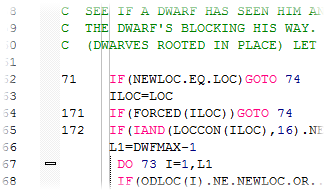
Because Simply Fortran is first and foremost a Fortran development environment, fixed-format Fortran (and Fortran 77 code) is well-supported by our editor. While other editors might provide syntax highlighting and column guides for fixed-format Fortran, our editor understands the specific constraints of fixed-format code. The Tab key will always initially advance directly to column 7, as one would expect. Block indenting and dedenting understands that line number labels, comment indicators, and line continuation categories must remain in proper column positions, moving the appropriate code and commented text only.
Our editor also detects the use of tabs in legacy Fortran code. While some older compilers were cavalier about using a leading tab to move code to the seventh column, our editor will detect and correct this non-standard behavior upon loading a file. This feature ensures improved portability of legacy code moving forward.
Understanding Legacy Structures

Simply Fortran's autocomplete is fully aware of legacy variable structures in Fortran, notably COMMON blocks. Typing the COMMON statement into Simply Fortran will trigger an autocomplete with known, named common blocks within a project. Simply Fortran's refactoring capabilities are also aware of common blocks to aid in quickly reorganizing legacy code.
Continued Support for Legacy Language Extensions
Our compiler will still allow Cray pointers with the simple click of a checkbox in Project Options. Variable initialization to zero and saving variable values between procedure calls are still available in our options window so that legacy code bases continue to behave as expected.



